Bidders
See who bid on Latvian tenders, who won and at what price - on each tender page, per company, per buyer, and for your own company.
Tendergate shows who bid on past Latvian public tenders, who won them and, for some tenders, what each bidder asked. You find this data in four places:
- the Past bidders on similar tenders section of a tender page
- the Bidders tab, where you search for a company and open its profile
- buyer pages, with the companies that bid for a buyer most often
- Your record vs the market, your own company's bids and rivals
Everyone in your organization can see it. It does not use credits.
Past bidders on a tender page
A tender page shows Past bidders on similar tenders in two groups: This buyer's similar past tenders and Other buyers' similar past tenders. Each past tender shows when its bids were opened, how many bidders it had, how it ended, and one line on why it counts as similar. Click it to see every bidder, the winner, the bid prices where known, and links to the procurement in EIS and to the notice.
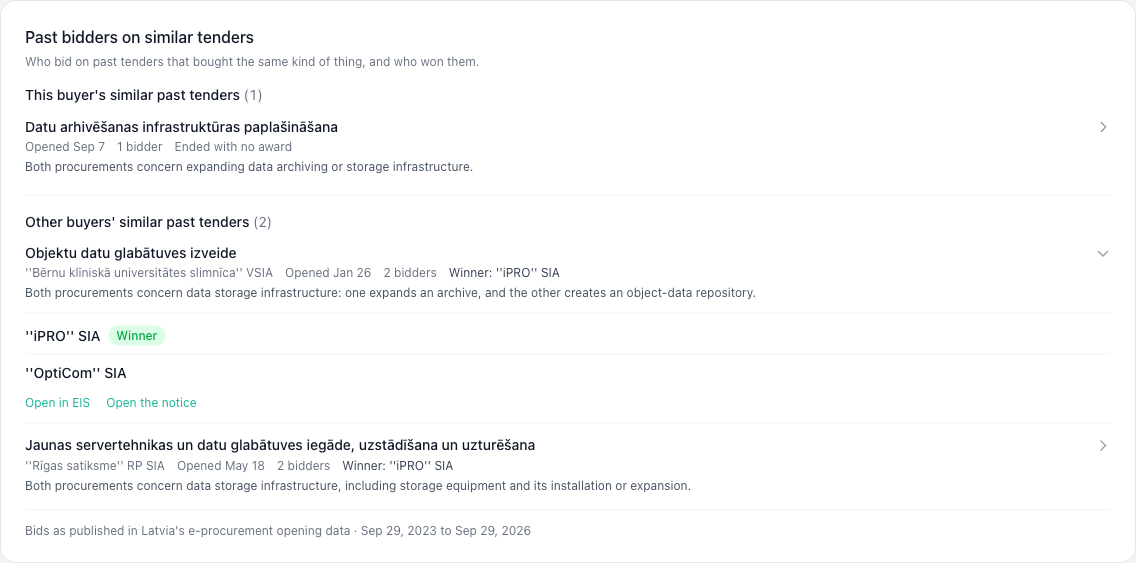
The first time anyone opens a tender, Tendergate looks for similar past tenders in the background. This usually takes under a minute, and the section fills in by itself.
Finding a company
Open the Bidders tab next to All tenders and Matched for you. Search by Company name or registration number; type at least two characters. The results list each company with its Bids seen and Wins. Click a company to open its profile.
Every bidder name elsewhere in Tendergate, for example in the past bidders on a tender page, also opens that company's profile.
Company profile
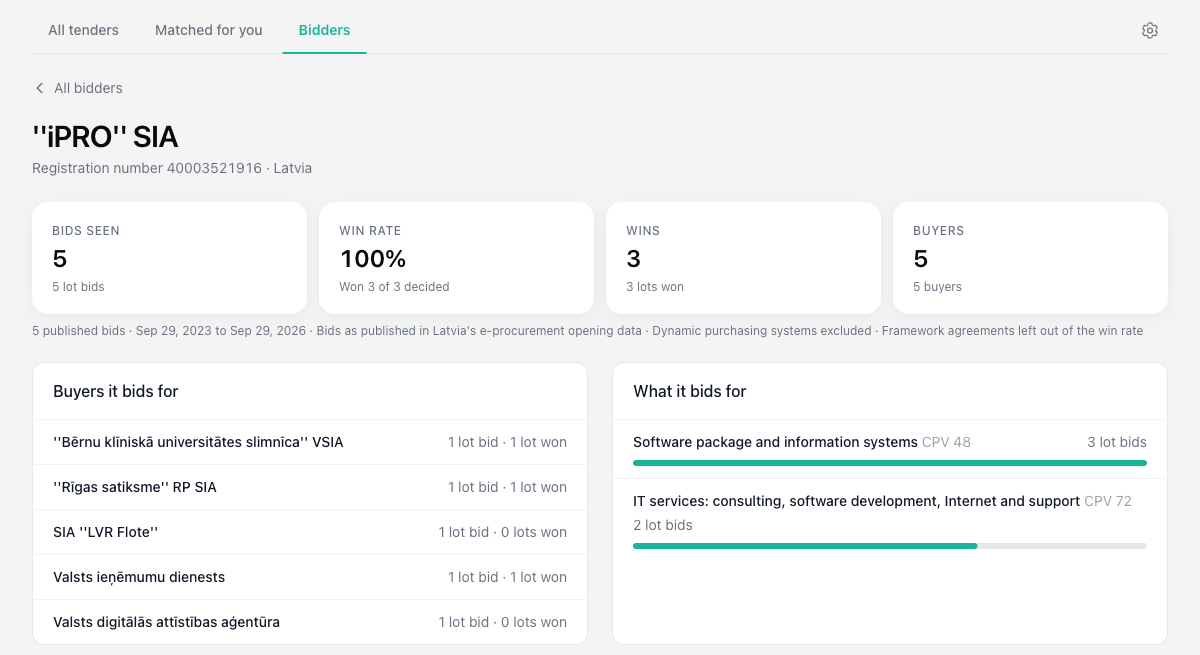
The profile starts with four figures:
| Figure | What it counts |
|---|---|
| Bids seen | Bids the company made, one per lot. |
| Win rate | Lots won out of lots with a decided result, for example "Won 3 of 5 decided". |
| Wins | Lots won. |
| Buyers | Different buyers the company bid for. |
Below the figures, a line shows what they are based on: the number of published bids, the period covered, the source, and what is left out.
The profile then shows:
- Buyers it bids for - with bids and wins for each. Click a buyer to open its page.
- What it bids for - the CPV divisions of its bids.
- Bids by quarter - bids per quarter, with the ones it won.
- Recent bids - the procurement, buyer, opening date, outcome, bid price and a link to the source.
- Head-to-head competitors - companies that bid on the same lots, with how many lots they shared and who won more of them.
Outcomes
| Outcome | Meaning |
|---|---|
| Won | The company won this lot. |
| Not won | Another bidder won. |
| No award | The procedure ended without a contract. |
| Winner chosen | The buyer chose a winner, but the contract is not published yet. |
| Result pending | No result yet. |
| Winner not matched | A winner is published, but Tendergate could not match it to one of the bids. |
Buyer pages
On a tender page, the buyer's name under the title links to the buyer page when Tendergate has bidder data for that buyer. Buyer names on a company profile link there too. It lists the buyer's Most frequent bidders and Most frequent winners.
Your record vs the market
Your record vs the market shows your own company's profile: your bids, your win rate and the companies you most often bid against. Open it from Your own record at the top of the Bidders tab.
First, an owner or admin links your organization to your company:
- Open the tender settings. Enter your company's Registration number under Company profile, and a VAT number under Account settings → Billing details. Tendergate checks the link against both.
- Under Your company in the register, click Find your company, search for it and click This is us. A company outside Latvia can be entered under Company in another register.
When the registration number and a valid VAT number match the company, the link is confirmed and Open your record appears. Otherwise it shows Unverified link and your record stays closed: correct the numbers and link the company again. Only your organization sees which company it is linked to.
Where the data comes from
Bidders and results come from Latvia's public e-procurement open data, which covers procurements run in EIS. Tendergate imports it every day. A procurement's bidders appear once its opening data is published.
Keep these limits in mind:
- Latvian tenders only. A tender from another country has no past bidders to compare against.
- Three years. Company profiles and buyer pages cover the last three years. Similar past tenders on a tender page go back to 1 January 2025.
- Bid prices for some tenders only. Prices are read from the documents the buyer publishes after the bids are opened, such as the opening protocol. This is currently done for IT software, IT services and computer equipment tenders published in IUB. Where no document has been read, the price is left blank.
- Left out. Dynamic purchasing systems are left out of all figures. Framework agreements are left out of the win rate.
Each price links to the document it was read from, so you can check it. A price can carry a note:
- Corrected after opening - a later document corrected the price. The earlier figure is shown under it.
- Documents state different figures - two documents disagree, and both figures are shown.
- VAT basis not stated - the document does not say whether the price includes VAT.
- Uncertain reading - the price was hard to read from the document. Check it in the document.
There is a daily limit on how many new tenders an organization can have past bidders prepared for. When you reach it, the tender page says so. Tenders already prepared open as usual, and the limit resets the next day.