Opening the bids
After the deadline, the openers approve the opening with their opening keys, and the opening record lists every bid.
Sealed bids stay encrypted until the openers open them after the deadline. Only the openers named on the tender can open them, and only on the sealing service, with their own opening key.
An open tender, where you see each bid as it arrives, has no opening: its bids are already in your Bids list. At the deadline it moves straight to Opened and you can compare prices and award.
Before the deadline
The Opening tab becomes available after the deadline. If the tender has an Opening from time later than the deadline, opening waits for it.
When the deadline passes, the openers get an email that the tender is ready to open. The sidebar shows Ready to open.
Open the bids
One opener
- On the Opening tab, click Open bids and confirm "Open the bids now? You are the only opener for this tender."
- Click Open the approval page. It opens the sealing service in a new tab. We also email you the link.
- Approve with your opening key: a passkey or an authenticator code.
- The bids are opened, and the opening record appears on the Opening tab.
Two openers
- One opener clicks Open bids.
- Each opener approves on the sealing service's page with their own opening key within 30 minutes. Each gets a personal link by email; the signed-in opener can also use Open the approval page. Resend my approval link sends it again.
- The Opening tab shows each opener as approved, with the time and method, or as waiting.
- When everyone has approved, the bids are opened and the opening record appears. If not everyone approves in time, nothing is opened: "Opening was not completed. Nothing was opened. Start again when everyone is available."
Simple purchases use one opener by default; you can choose two. Regulated procedures always use two openers, opening together.
Under MK 104 rules, each opener signs a no-conflict declaration before their first approval, and confirms on the approval page that they can act impartially in opening the bids.
Opening prices later
In a regulated tender with Open prices later, the opening has two stages. First open the Qualification and technical sections, then, in a second opening with the same steps, the Financial section. Until then the price grid says "Prices are opened in a separate step."
When opening waits or stops
- Opening is paused: Tendergate had a service interruption close to the deadline, and we are checking whether the deadline must move by one working day. You can open once that check is done.
- The deadline or the openers changed: start the opening again.
- Opening stopped because of a technical error: nothing is lost. Click Try again.
- Opening is stopped: the protection of these bids is being checked: the bids cannot be opened until that check is done.
The opening record
The Opening record states only what the signed opening events show:
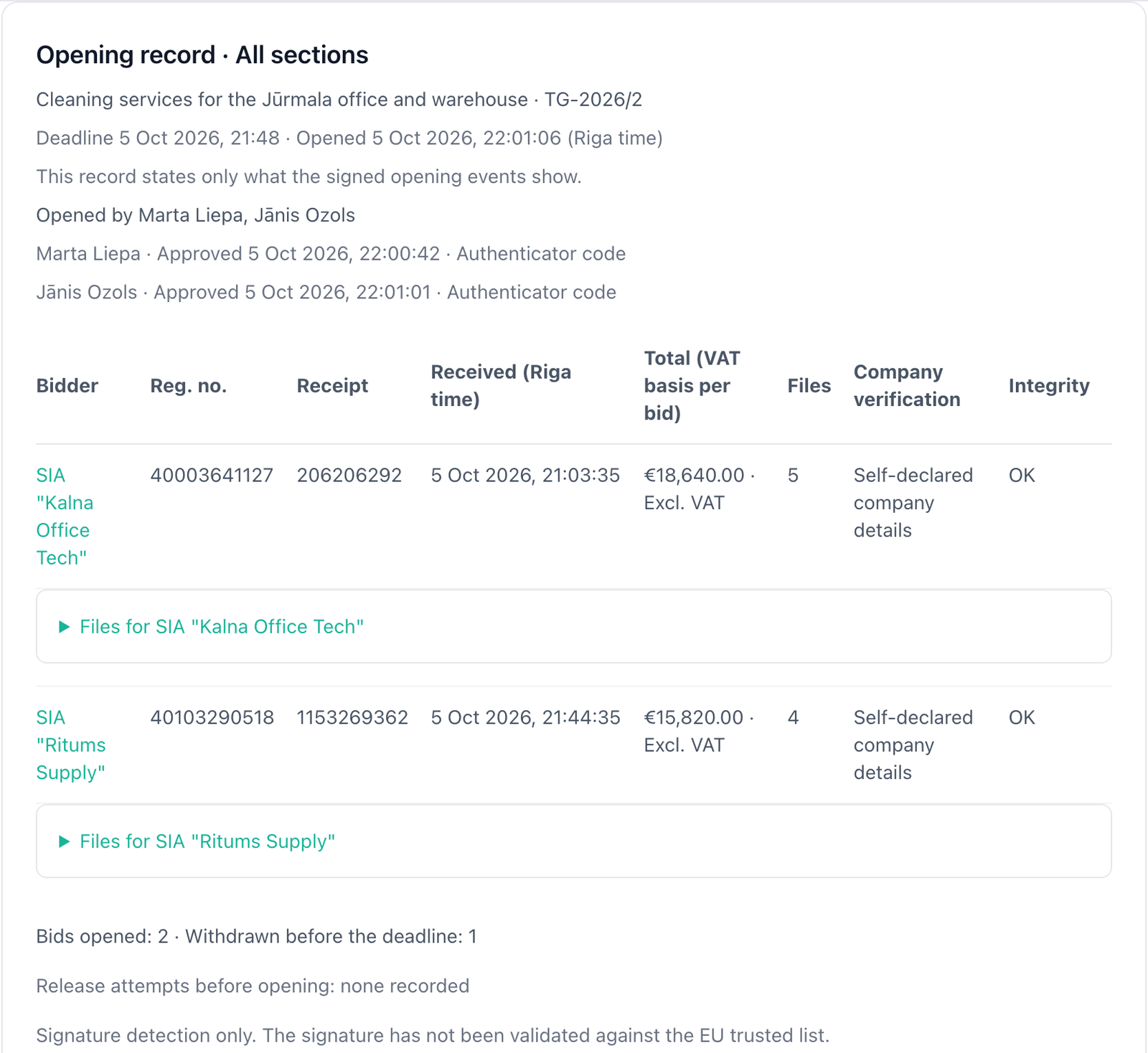
- the deadline and the time the bids were opened, in Riga time;
- who opened them, with each opener's approval time and method, or "Opened by one person, as the rules allow";
- for each bid: the Bidder, Reg. no., Receipt number, Received time, Total, number of Files, Company verification (Self-declared company details or Company details verified in the register) and Integrity (OK or Does not match the receipt);
- each bid's files, with section, file name, size, SHA-256 and signature status. Signature status is detection only; the signature has not been validated against the EU trusted list;
- the counts: "Bids opened" and "Withdrawn before the deadline";
- "Release attempts before opening": none recorded, or how many were recorded and refused.
Only the latest version of each bid is opened. Replaced and withdrawn versions are never opened; only their count is shown. When two bids carry the same registration number, both rows say so.
Use Print or Download (JSON) to keep a copy. Under After the award, a private purchase can also Send the opening record to bidders.
A bid that fails the integrity check
A bid whose files do not match its receipt, or whose encryption check fails, is listed as Not opened with the reason. Its contents are not shown, and the encrypted copy is kept as evidence.
Who can read the opened bids
Each opened bid becomes an ordinary bid in the procurement's Bids list, named after the company, with its files in their sections and its receipt number. From there you can run bid analysis as usual; it uses credits.
- In a simple purchase, every member of your organization can read the opened bids.
- In a regulated procedure, only the openers and evaluators can. Other members see "Only appointed openers and evaluators can view these bids." The same applies to the prices and the award decision.
Next: Compare prices and award.
Invitations, questions and amendments
Invite companies to bid, answer bidders' questions for everyone, and change a published tender with numbered amendments.
Compare prices and award
Compare the opened bids item by item, record and approve the award decision, notify bidders, record the contract and keep the evidence package.