RFP quality review
AI-powered review of your RFP documents for quality, clarity, and completeness before publishing.
Before publishing your RFP and inviting vendors to bid, you can have the AI review it for quality issues. Think of it as a colleague reading your requirements and pointing out problems before they become expensive to fix.
What it checks
The AI reads your RFP documents and evaluates them across eight categories:
| Category | What it looks for |
|---|---|
| Clarity | Ambiguous language, vague requirements, undefined terms |
| Completeness | Missing sections, gaps in requirements, undefined processes |
| Consistency | Contradictions between sections, conflicting requirements |
| Fairness | Requirements that unfairly favor or exclude specific vendors |
| Criteria quality | Vague evaluation criteria, missing scoring methodology |
| Timeline | Unrealistic deadlines, missing dates, scheduling conflicts |
| Legal | Missing legal clauses, regulatory compliance gaps |
| Budget | Unclear pricing requirements, missing cost structures |
Choosing the legal jurisdiction
The Legal category is checked against actual procurement-law rulebooks, and you control which ones. When you set up a procurement, the Legal jurisdiction field offers these choices:
| Jurisdiction | What the quality check applies |
|---|---|
| Auto-detect (AI) | The AI infers the most likely jurisdiction from your documents. The default. |
| EU | The harmonized EU procurement directive only — not any national law. |
| EU + Latvia | The EU directive plus Latvian national procurement law. |
| EU + Estonia | The EU directive plus Estonian national procurement law. |
| EU + Lithuania | The EU directive plus Lithuanian national procurement law. |
| EU + Poland | The EU directive plus Polish national procurement law. |
| EU + Germany | The EU directive plus German national procurement law (GWB and VgV). |
Pick the jurisdiction that matches where the procurement runs so the Legal findings cite the rules that actually apply to you. Auto-detect also recognizes other EU/EEA countries and applies the EU directive when there is no dedicated national rulebook yet. You can change the jurisdiction any time from the procurement form.
Before you start
Quick checklist:
- Your RFP documents are uploaded and show Completed status (via the Upload RFP step)
- You have enough credits (check your balance in the top bar)
You don't need bids uploaded — this reviews the RFP itself, not vendor proposals.
Running a quality review
Start the review
Click Quality Check in the sidebar workflow. If your RFP documents are ready, you'll see a Run Quality Check button. Click it and the review starts immediately.
You can also start a quality check from the Overview page via the actions menu.
Watch the progress
The AI reads through your RFP documents and records findings as it goes. You'll see a two-panel layout:
- Left panel — findings appear progressively as the AI discovers them
- Right panel — the agent activity feed shows what the agent is doing in real time (reading sections, evaluating categories, recording issues)
The sidebar shows a spinning loader next to "Quality Check" while the review is running.
Unlike bid analysis, there's no verification phase. The review goes straight from reading to findings.
Review the findings
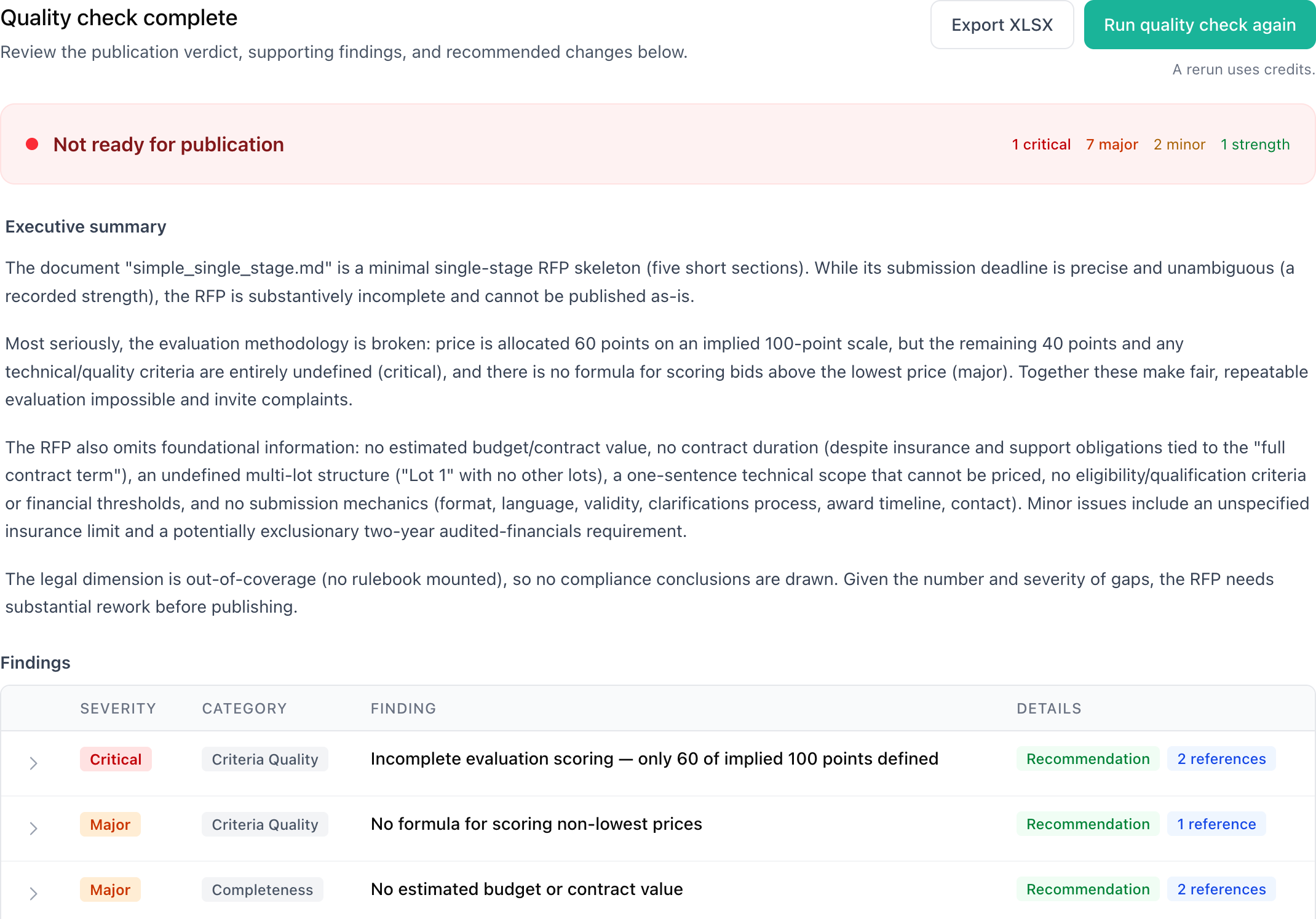
Each finding includes:
- Severity level — how serious the issue is
- Category — which of the eight areas it relates to
- Description — what the problem is
- Evidence — the specific text from your RFP that triggered the finding
Read the executive summary
When the review finishes, you get an executive summary with an overall recommendation — one of four levels telling you how ready your RFP is for publication. The sidebar updates to show a green checkmark next to "Quality Check".
Understanding severity levels
Findings come in four severity levels:
| Severity | What it means |
|---|---|
| Critical | A serious issue that could undermine the entire procurement. Fix before publishing. |
| Major | A significant problem that could cause confusion or unfair outcomes. Should be addressed. |
| Minor | A small issue worth fixing but unlikely to cause major problems. |
| Strength | Something your RFP does well. No action needed. |
Understanding the recommendation
The executive summary includes one of four recommendation levels:
| Recommendation | What it means |
|---|---|
| Ready to Publish | No significant issues found. Your RFP is good to go. |
| Minor Improvements Needed | A few small issues. Quick fixes before publishing. |
| Significant Revision Needed | Several important problems. Take time to revise before publishing. |
| Not Ready for Publication | Critical issues that need to be resolved first. |
Peer Insights
Alongside the quality findings, the review can show Peer Insights — a comparison of your RFP against similar tenders that other organizations have already published. It's a way to learn from real precedent: how peers who bought comparable things set up their evaluation, what qualification requirements they used, and which sections they included.
Open the Peer Insights tab in the review to see them. Insights are grouped by the source tender, and each one shows:
- The similar tender it's drawn from, with a link to the original and how closely it matches yours
- The area being compared — evaluation method and criteria, requirements and qualifications, or document structure
- A plain comparison of what the peer did versus what you're doing, with a suggestion
- An applicability hint — likely, maybe, or unlikely — our best guess at whether the peer's approach is worth adopting
Peer Insights are advisory. They never change your quality recommendation and don't count as findings — they're suggestions you can weigh and apply at your discretion. Dismiss any insight you don't find useful and it won't come back.
If there aren't yet enough similar tenders to compare against, the tab shows an honest empty state instead of low-confidence guesses. Coverage is strongest for Latvian tenders today and improves as more published tenders are analyzed.
Exporting findings to Excel
Click the download button in the review header to export all findings as an Excel spreadsheet. The export includes the overall recommendation, executive summary, and a severity-coded findings table with descriptions, recommendations, and evidence. Share the spreadsheet with stakeholders or archive it for your records.
Regenerating a review
If you've updated your RFP documents based on the findings and want a fresh review, click Regenerate on the Quality Check page. The new review replaces the previous one. Each run costs credits.
Credit cost
An RFP quality review costs credits, similar to running an analysis. The cost depends on the size of your RFP documents. A typical review costs 1–3 credits — generally less than a full bid analysis since it's only reviewing one set of documents.
See pricing for more detail.
Running a quality review before publishing can save you time and money. Catching an ambiguous requirement now is much cheaper than dealing with vendor clarification requests or bid protests later.
When to use it
- Before publishing your RFP to catch issues early
- After major revisions to make sure edits didn't introduce new problems
- For complex procurements where multiple people contributed sections and consistency might be an issue
This is not a substitute for legal review — it's a quick AI-powered quality check that supplements your own review process.