Receipts and verification
What a submission receipt shows, how to download and verify it, how to check your files' fingerprints, and what happens when Tendergate is down close to a deadline.
Every time you submit, replace or withdraw a sealed bid on a Tendergate tender, you get a submission receipt signed by Tendergate. Keep it: it proves what you submitted and when.
Where to find your receipt
- By email. After each submission you get an email with the signed receipt attached as a JSON file.
- In your bid workspace. On the Submission page, click View receipt (or View withdrawal receipt). If the tender requires submission keys, first unlock with your key: Unlock to view the receipt.
What the receipt shows
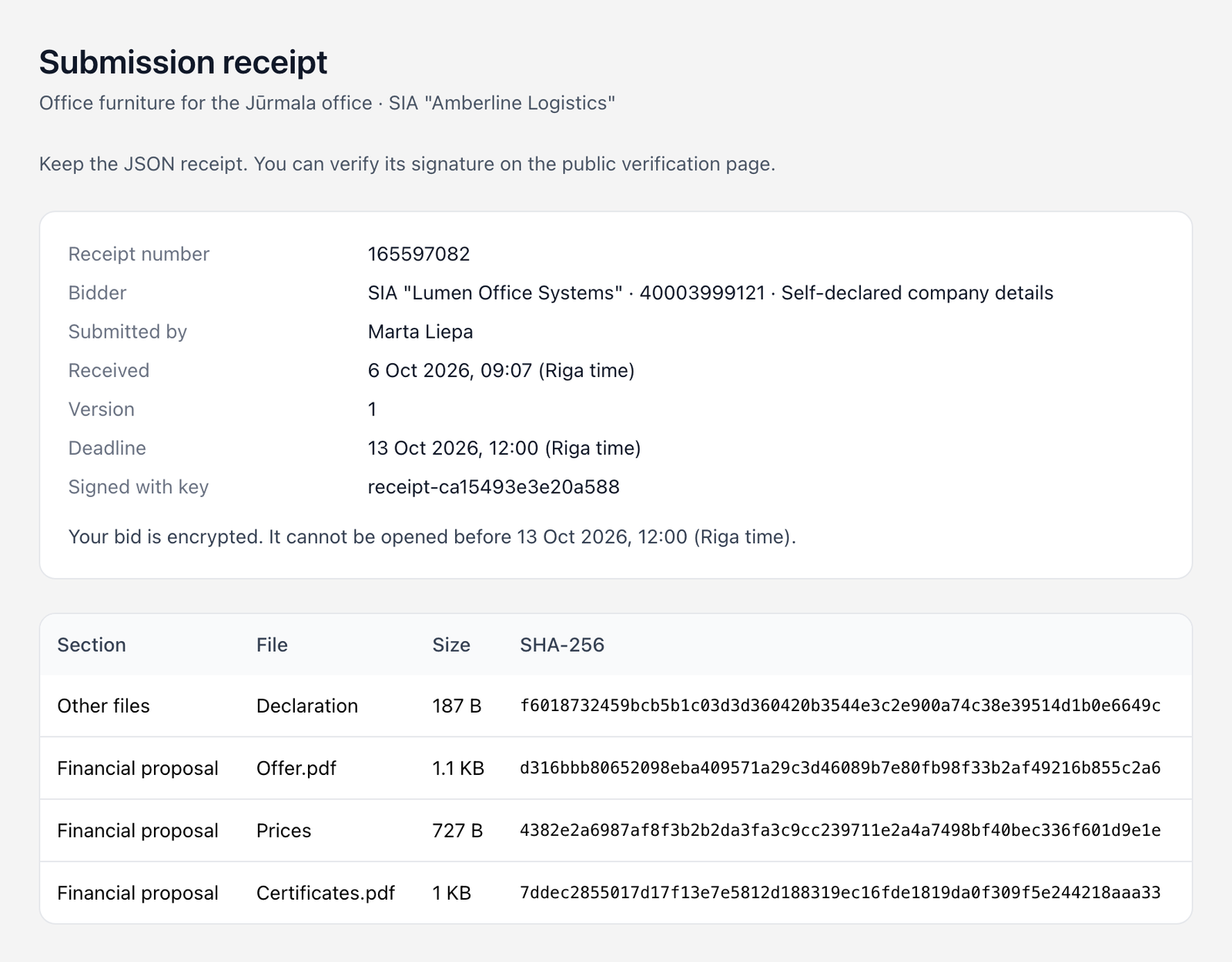
| Field | Meaning |
|---|---|
| Receipt number | The number of this receipt |
| Bidder | Your company, its registration number, and Self-declared company details or verified in the register |
| Submitted by | The person who submitted |
| Received | When the sealing service recorded the bid, in Riga time |
| Version | 1 for the first bid; a later version says which receipt it replaces |
| Deadline | The submission deadline |
| Signed with key | The Tendergate key that signed the receipt |
Below the details, the receipt says "Your bid is encrypted. It cannot be opened before" the deadline. Later it says when the deadline has passed, when the bids have been opened, or when a later version replaced this bid or the bid was withdrawn. Only the latest version is opened.
The file table lists each Section, File, Size and SHA-256 fingerprint. It also lists your Prices and your Declaration, which are sealed as separate entries.
Under the receipt:
- Print prints it.
- Download receipt JSON downloads the signed receipt. Keep this file: it is the one you can verify.
- Verify a receipt opens the public verification page.
- How sealed submission works opens the public explanation.
Verify a receipt
Anyone can check a receipt, for example you, the buyer or an auditor, at tendergate.ai/receipts/verify.
- Paste the receipt JSON, or upload the receipt file (.json).
- Click Check receipt.
The result is one of:
- "This receipt was issued by Tendergate and has not been changed.", with its number and the time received;
- "This receipt does not match Tendergate's signature. It may have been changed.";
- "This is not a Tendergate receipt."
The page only checks the receipt you give it. There is no receipt search, so nobody can look up receipts there.
Check your files' fingerprints
The receipt holds the SHA-256 fingerprint of each file as the sealing service received it. To prove a file in your bid is exactly your copy, compute the fingerprint of your copy with any SHA-256 tool and compare it with the receipt:
| System | Command |
|---|---|
| macOS | shasum -a 256 "Offer.pdf" |
| Windows | certutil -hashfile "Offer.pdf" SHA256 |
| Linux | sha256sum "Offer.pdf" |
If the two values match, the file you submitted is byte for byte your copy. The buyer's opening record checks the opened files against the same fingerprints: a file that does not match shows as "Does not match the receipt".
Withdrawal receipts
When you withdraw a bid, you get a Withdrawal receipt with its own Withdrawal receipt number. It shows which bid was withdrawn and when. Use Download withdrawal receipt JSON to keep it, and check it on the same verification page with Verify a withdrawal receipt. You can submit again until the deadline.
Service outages and deadline extensions
If Tendergate is unavailable close to a deadline, the deadline is extended. A qualifying outage extends the deadline by one working day: at least 120 minutes in the last 24 hours before the deadline, or 10 minutes in the last four hours. Opening waits for the extension to reach the sealing service.
When a deadline moves:
- the tender page shows a Service notice under Changes: "Tendergate was unavailable from … to … (Riga time). The deadline moved by one working day to" the new date;
- your bid page says "The deadline was extended following a service interruption. The deadline shown here is confirmed by the submission service.";
- followers of the tender get an email, "Tender deadline moved";
- the public page tendergate.ai/service-notices lists every interruption and the tenders whose deadlines moved.
A service notice is not an amendment: the tender documents do not change.
How sealed submission works
The public page tendergate.ai/sealed-submissions explains the whole process. In short:
- Your browser encrypts each file and your prices before upload. Tendergate's servers store only encrypted data.
- The qualification, technical, financial and other parts are sealed separately, so a buyer can open prices later than the rest.
- After the deadline, the buyer's opener opens the bids, or two openers together, each approving on the sealing service. Every opening is recorded in a log that cannot be changed.
Tendergate operates the sealing service and holds its keys, so that opening is possible. Someone with direct access to those keys could decrypt bids outside the app. Every opening through the app needs the openers' approval and is signed. The public page explains who can access the keys.
Open tenders
On an open tender the buyer sees your bid as soon as you send it, and there is no signed receipt. You get a confirmation email, "Bid received", with the version, number and time. See Open tenders.