Features

Every stage of procurement. Start at the one you're at.

Tools for procurement teams and vendors, from the annual plan to the contract award.

Create a free account

Procurement teams

Plan procurements

Plan the year before the first tender. Keep the annual plan in one register. The agent checks thresholds, lead times and contract splitting.

Explore procurement planning
A planning finding: laptops and monitors planned as two simplified procurements add up to a national procedure.

Procurement teams

Research the market

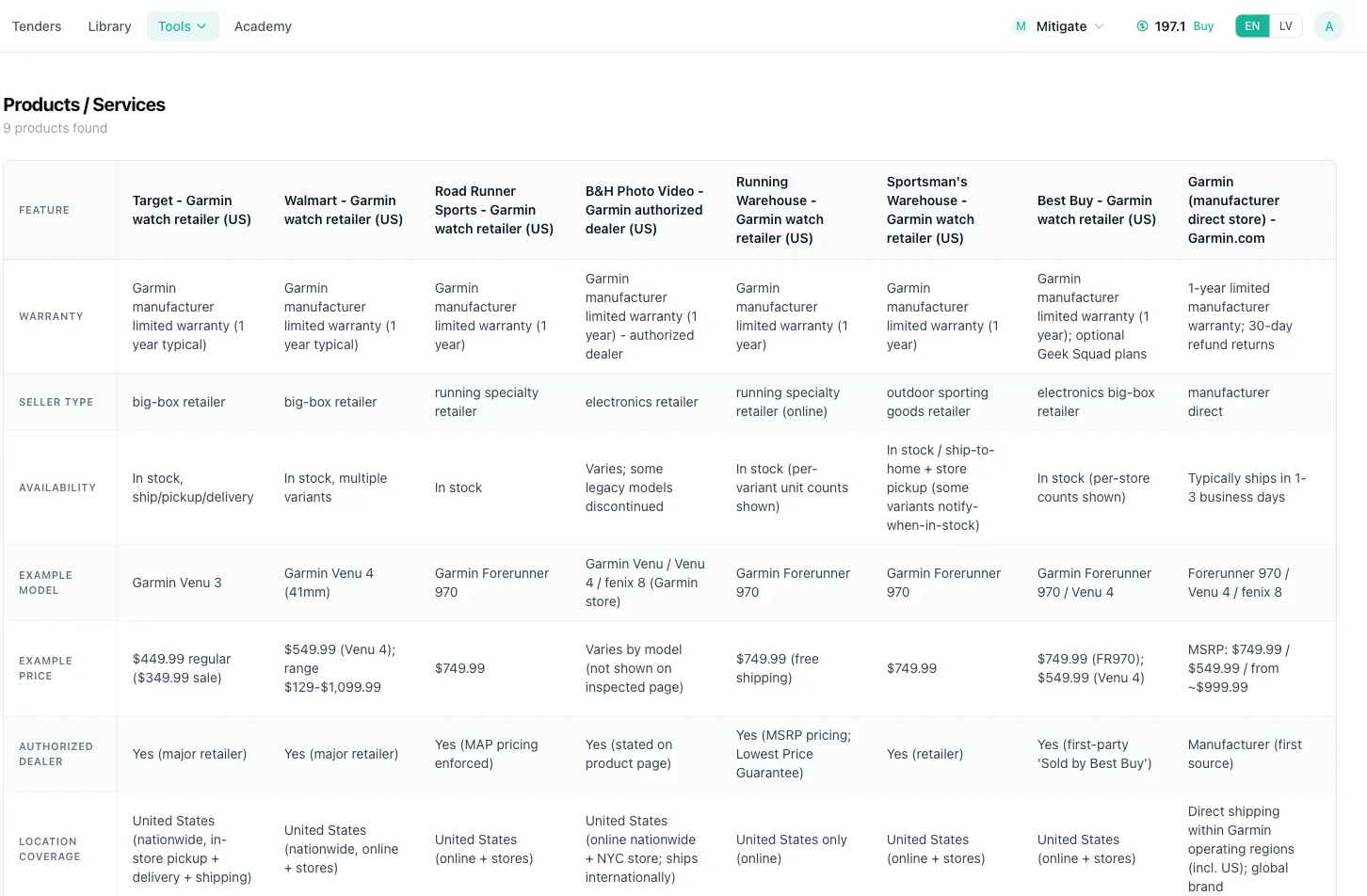
Know the market before you write the specification. The agent finds products and suppliers, compares prices and checks each product against your specification.

Explore market research
A market research report with price ranges per item and the cheapest charger marked as off specification.

Procurement teams

Draft the RFP

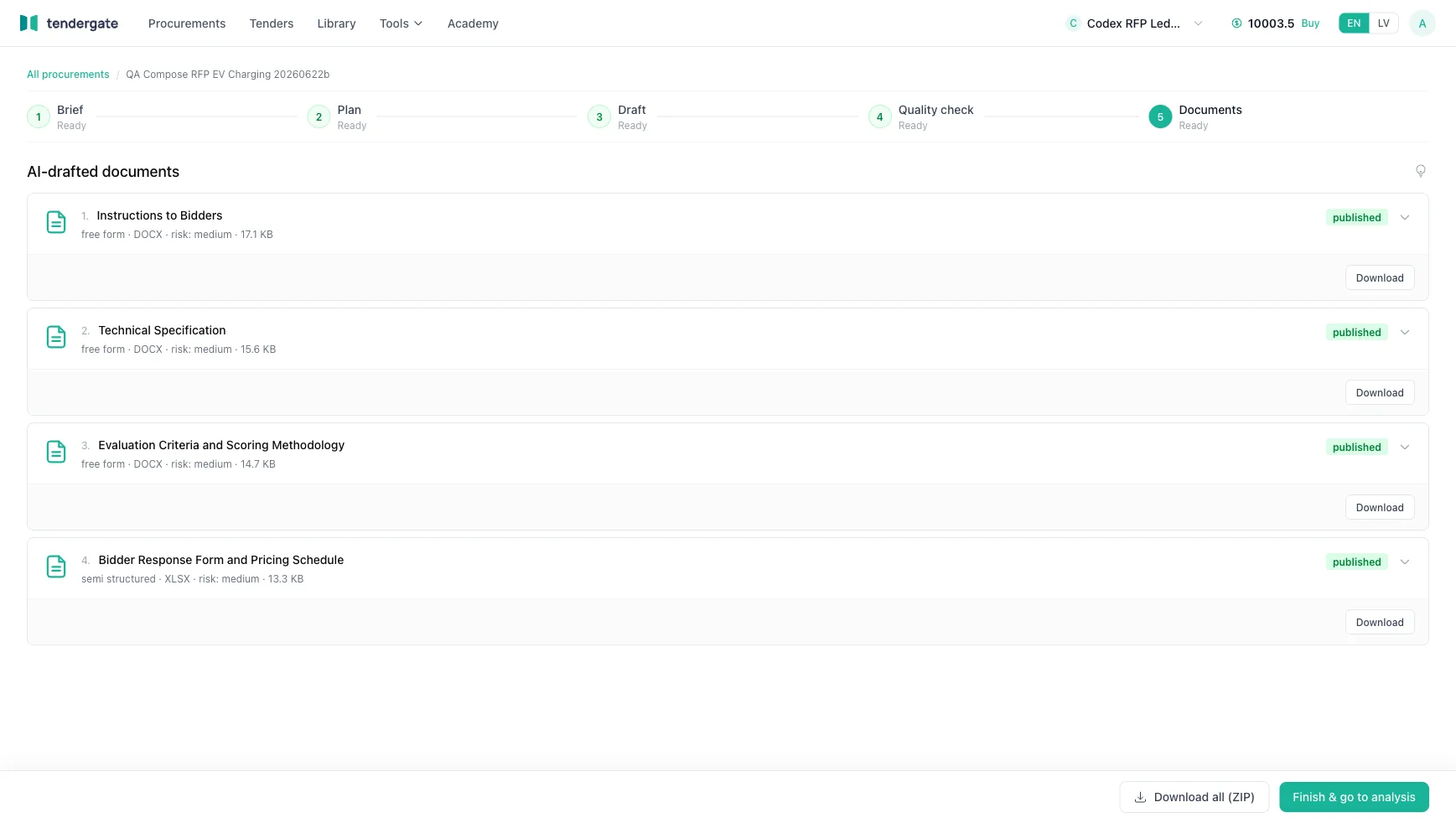
Decide first, then draft. Settle the key procurement choices. The agent drafts the specification, criteria, forms and contract from them.

  • A guided interview settles the scope before drafting starts
  • One package: specification, criteria, contract and forms
  • Edit in the browser and export to DOCX
Explore RFP drafting
The drafted RFP package: instructions to bidders, technical specification, evaluation criteria and the response form.
The saved procurement design: open procedure, two lots, award method still to decide.

Procurement teams

Check the RFP

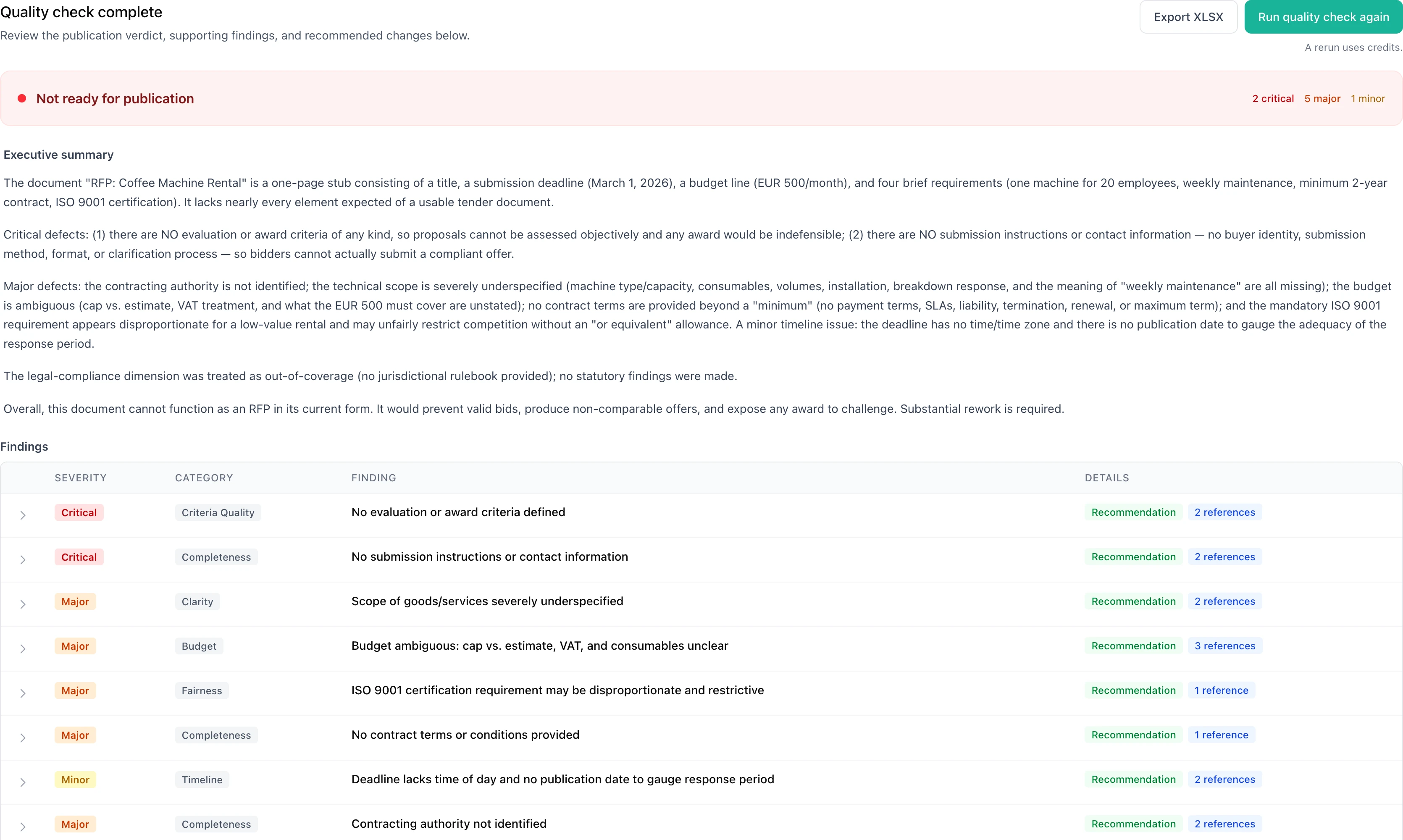
Fix the RFP before bidders see it. The review flags missing details, conflicts between documents and unclear scoring rules before you publish.

Explore RFP quality check
  • A deadline in the RFP that contradicts the submission form
  • A warranty or turnover threshold stricter than in comparable tenders
  • Requirements that drew complaints in comparable tenders

Comparable tenders and complaint precedents are available for Latvian tenders.

An RFP quality review: the verdict, a summary of all four documents and the first finding.

Procurement teams

Publish the tender

Publish a price quote or a full tender. Compare the bids item by item in the same workspace.

Prices from every opened bid, item by item, with the lowest price in each row marked.

Reaching suppliers

The tender catalogue
Companies looking for work read it without an account.
Emails to matching companies
Sent right after you publish.
Your own website
One snippet lists your tenders with status and deadline.
Invitations from the app
From your supplier list or by email. Everyone gets the same message and link.
One answer for everyone
Suppliers ask on the tender page, and everyone sees your answer.

Bids stay sealed until the deadline. Bidding is free.

Explore tender publishing

Vendors

Find tenders

Tenders scored against your services. From 14 national sources and EU TED. Each one is also checked against your company profile.

Explore tender discovery
An eligibility check of a tender against the company profile: five requirements met, one licence not found.

Vendors

See the competition

Know who you are bidding against. See who bid on similar tenders, who won and at what price. Each price links to the document it came from.

Bidder data covers Latvian public tenders.

Explore bidder data
Past bidders on similar tenders: each tender with its bidders and the winner.

Vendors

Prepare the bid

Every document the tender asks for, in one checklist. Built from the tender documents: what the agent drafts, what you attach and what is still missing.

Explore preparation checklists

Vendors

Draft the bid

A complete bid, every item tracked. The agent drafts each document from the tender and your company library. Your team approves every answer.

Explore bid drafting

Vendors

Check the bid

Your bid against every requirement. The agent reads the tender and your whole bid package, and shows what is met, missing or weak.

Explore bid review
A bid checklist: documents the agent will draft and documents you must attach, each with its source in the tender. The drafted bid package: technical proposal, service plan, pricing schedule and declarations, with requirement coverage for each. The bid check: a missing insurance certificate, a price conflict between documents and other verified findings.

Where the lanes meet

Submission deadline. The bids are opened.

Vendors

Submit the bid

Sealed until the deadline. Bids are encrypted before they leave the bidder's computer. The buyer's openers open them after the deadline.

  • Bidders read the tender without an account
  • Replace or withdraw the bid until the deadline
  • Only the latest version is opened
  • Submitting a bid is free
How sealed submission works

Procurement teams

Evaluate bids and award

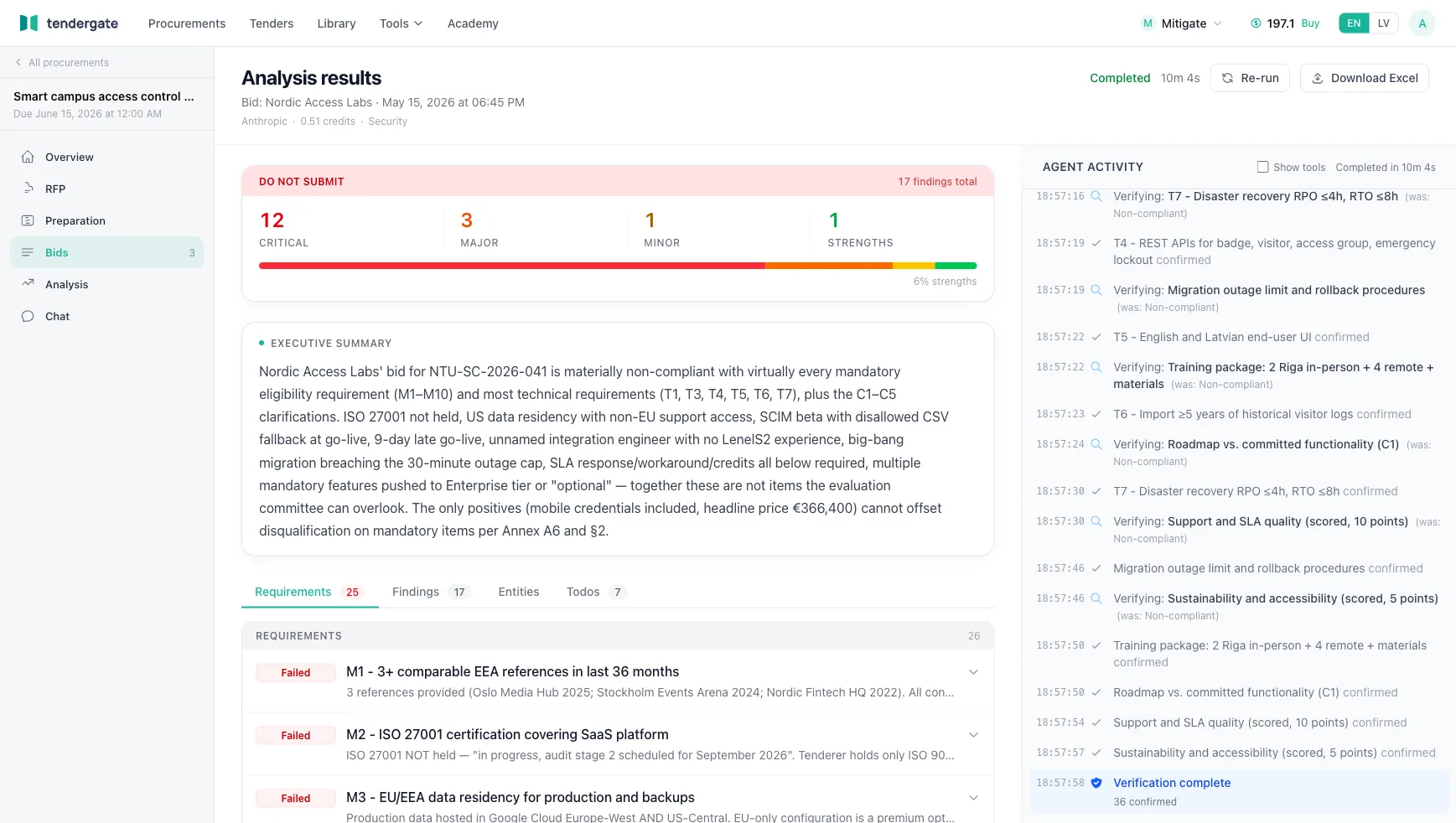
Every bid against every requirement. The agent compares the bidders side by side and links each finding to the page it came from.

  • Requirements, criteria and lots taken from the RFP
  • Latvian bidders screened against public registers
  • Prices compared item by item, and the award recorded
Explore bid analysis
Three bidders compared criterion by criterion, with issues counted per bidder.
One cell opened: the ISO 22000 certificate is referenced, but the evidence supplied does not verify it.

Across every stage

AI assistant

Ask questions about every uploaded document. Each answer cites its source.

What is the budget ceiling? 30,000 EUR excluding VAT [1]

Explore the assistant

Funding research

Grants and funding programmes that fit a project, with eligibility, deadlines and conditions.

For each programme Status, amount range, closing date and funding body.

Explore funding research

MCP connection

Use Tendergate from your AI chat app, with permissions and credit allowances you control.

From the chat app Show my workspaces and their latest analysis results.

Explore MCP

Bring your next tender. See what the agents find.

For procurement teams

Check the RFP before it goes out. Evaluate every bid after.

Upload the tender package or the bids you received.

Create a free account

For vendors

Find the right tenders. Submit a bid with no gaps.

Upload the tender and your bid package before the deadline.

Create a free account
10 free credits after verification. No credit card required. Larger organisation? Talk to us