Find tenders
Search the public catalogue, inspect a tender, and start a bidder workspace with its available documents.
Connect your AI app to Tendergate through MCP, the Model Context Protocol. Ask it to find a tender, read your documents, or run a bid analysis — with the work and results kept in Tendergate.
Your connected app can use the Tendergate tools you authorize. Start with reading, then add draft editing or agent runs when you need them.
Search the public catalogue, inspect a tender, and start a bidder workspace with its available documents.
Ask about your procurements, bids, and existing findings. Retrieve source evidence and follow links back to Tendergate.
Create or update supported procurement and bid drafts. Add documents or supplied text without rebuilding the workspace in chat.
Start bid analysis, requirement extraction, RFP quality review, or integrity checks using Tendergate's existing workflows.
Launch market or funding research, answer follow-up questions, and return to the results when the work is ready.
Check a run's progress and download available reports. Long-running work continues in Tendergate between chat messages.
You choose the access
Review the requested permissions when you connect. Each connection belongs to one organization and stays within your role and its settings.
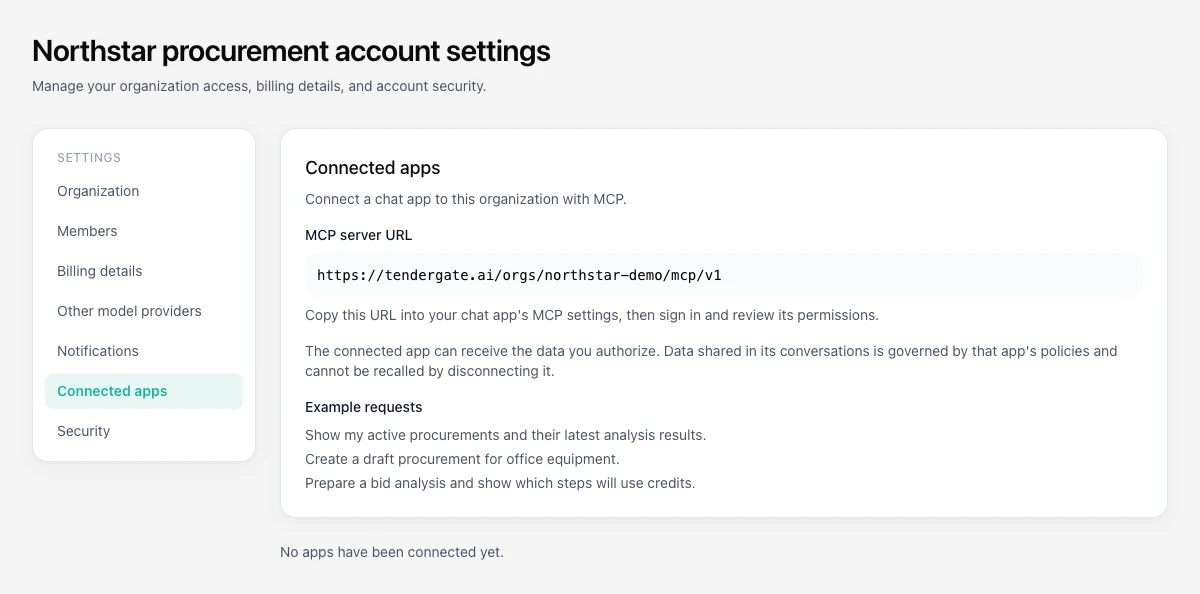
An organization owner or admin enables MCP in account settings under Connected apps. Copy the organization's MCP server URL.
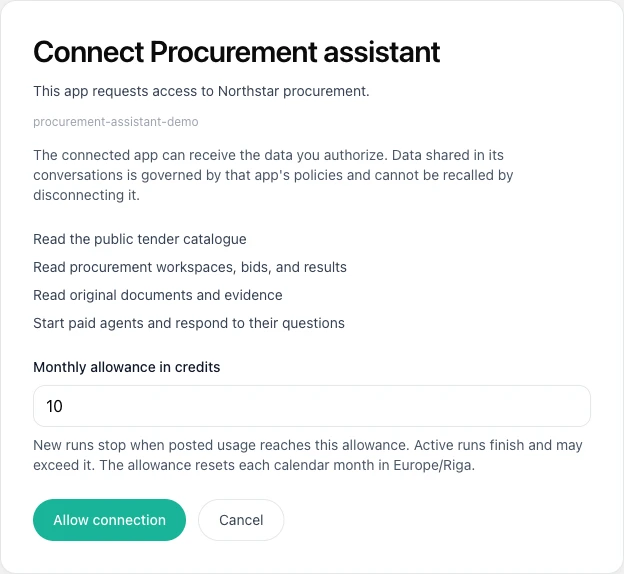
Add the URL in an app that supports remote MCP with OAuth. Sign in to Tendergate, review the permissions, and set an allowance if paid runs are requested.
Try: Show my active procurements and their latest analysis results. Then open the linked workspace to inspect the evidence or continue your work.
Use an app that supports remote MCP over Streamable HTTP with OAuth. OpenCode has been verified locally. Other clients, including ChatGPT and Claude, may depend on their plan, settings, and connector support; they have not yet been verified for this integration.
Tendergate adds no MCP surcharge. Paid agents use your organization's credits as usual. A connection's monthly allowance blocks new runs once posted usage reaches it; work already running may exceed it. Your AI app may have its own fees.
The app receives the data you authorize under its own policies. Revoking the connection stops future access, but cannot remove data already delivered to that app or its conversation history.
It supports catalogue and workspace reads, selected draft edits, document transfers, and the checks and research listed above. Full RFP or bid composition, procurement planning edits, tender submission, and supplier messaging are not exposed through MCP. Use Tendergate for those workflows.
Connect your AI app and keep your documents, analysis, and results together in Tendergate.
Get started free